|
|
Wireless Alternatives: |
 LANDLINE ALTERNATIVES: LANDLINE ALTERNATIVES:
- Cellular:
Using
your cellular phone at home is the simplest way to cut the cord as long
as you have reliable coverage. You only pay for one phone for calls
both in and away from home, and normally you can make free Long
Distance calls from almost anywhere. Your number stays with you, and
you can also use cellular as your connection to the Internet.
- Wireless Home Phones:
Several cellular carriers now offer a device specifically designed to
make your wired phones work like "normal" home phones but using a
cellular connection. In most cases, they provide a unit that sits on a
table or wall and the calls are completed by a wireless connection to
the nearest cell site. In most cases you can plug in all of your
existing phones, both cordless and corded. You pay a monthly fee and,
like a cellular phone, all the popular calling features are included
like Unlimited Calls, both Local and Long Distance, Call Waiting, Call
Forwarding and Voice Mail. This is not a new concept but these units
are now being offered by the cellular carriers themselves with quite
reasonable rates...some as low as $15 per month. The Steps for
Switching are the same
as cellular. We have links to these specific Wireless
Home Phones.
- Broadband
Phones:
You get software and/or
hardware from the provider and attach it to your broadband connection.
In most cases you have a wired connection and lose the portability of
Cellular. You can make free calls to people with similarly-equipped
computers ("computer-to-computer") and discount calls to any normal
phone number. Some allow a wireless connection to use a cordless phone
around the house, otherwise, you need to plug the phone into your
computer or modem. Broadband from your cable TV company provides both
the ability to access a broadband supplier and a "normal" phone
connection. Some online services offer a "follow me" service that
allows you to program what incoming calls go to what phone at what time.
|
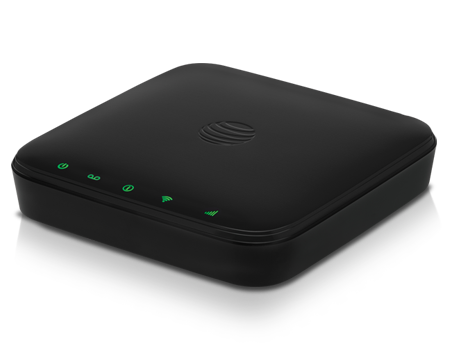
- The
Wireless Hotspot:
You can buy a small box from the wireless carriers
or secondary sources that accesses a cellular network and
re-distributes the Internet through a Wi-Fi connection to several
devices.
- Wireless
Modem:
This
can be an external box or a small USB adapter that plugs in to your
desktop computer or laptop. These plug-in devices can be moved among
equipment and locations. Carriers and re-sellers offer special plans
for these adapters, usually with Unlimited broadband usage with 4G LTE
speeds.
- Wireless
Home Phone + Internet:
A single box connects your home phones and online devices through a
wireless connection. Connection to your computer and other
devices is made through a wi-fi connection.
- Cellular-Enabled
Devices:
Many
tablets offer the option of accessing the Internet directly, both at
home and away. Many wireless carriers and re-sellers now offer special
tablet plans with Unlimited broadband access often at 4G LTE speeds.
While some devices need to have internal circuitry that will work with
cellular broadband, others can accept just a SIM or USB plug.
- Your
Smart Phone:
You can
use a Smart phone for all of your internet activities at home including
accessing a printer and other conveniences. Some Smart phones offer
"tethering" which enables you to connect a computer or similar device
to the Internet through a Wi-Fi connection provided by the Smart phone.
Some wireless plans and some carriers restrict tethering capability.
- Satellite Broadband:
It
sounds like it should be available anywhere but you still need a
cellular connection for the uplink. It may work in a location where
other things have failed and it can be bundled with satellite TV
service.
- Shared
Wi-Fi Access:
Many
of us have accessed a neighbor's Wi-Fi, at least until they
password-protected the signal. Why not offer your neighbor a small fee
to share their access codes? Also, they may be more willing to move
their wireless router closer to you, improving your signal and possibly
your download speeds.
 |
TV
WITHOUT THE CABLE |
- Get an Antenna:
Yes, it seems silly, but you can get broadcast TV channels Free, often
with the simplest antenna. Over the air TV is truly High Definition,
usually better than heavily compressed cable and satellite channels. Many
TV antennas are small enough to fit on a bookshelf or hung on the wall.
Some outdoor TV antennas can be mounted discretely on the side of the
house instead of on the roof. Since 2009, US TV signals have been
digital and usually broadcast in HD. If you watch mostly news or
network shows like "The Big Bang Theory," this may be all you need.
Over-the-air broadcasts work with DVRs like TiVo, which nicely blends
live TV and Internet streaming services. Your
experience may vary depending on how far you live from broadcast
towers. To see what an antenna can do for you, start by typing your
address into the site tvfool.com, which plots what broadcast channels
you should be able to receive and where to direct your antenna. You can
start with a simple antenna based on your distance from broadcast
towers. You may be
surprised how many channels you can get.
- Connect
with Your Smart Phone:
Some
'cable' channels offer their video free over the Internet via apps or
by simply visiting a web site. Those channels include many of
your
local broadcast stations, each of the broadcast networks and paid
services. In some cases, you can't get the service for free,
or
even paid, so on the your smart phone...you need a "Log in."
- Find a 'Log in'
What about
the channels that refuse to sell streaming access? Many
networks restrict Internet access to cable TV subscribers,
locked behind a Login. Some claim the economics of selling direct
online access doesn't work, although this is changing.
Some cable
cutters deal with this by "borrowing" logins. It's one of the moral
gray zones of being a modern digital consumer. HBO and ESPN say their
services are meant only for use by one "household," but they don't seem to be
keeping people from sharing. Most channels allow at least three
simultaneous streams. They don't check that you live together or cut
you off for using it in different corners of the US. You may be able to
legitimately use a Login from a second home, a subscribing organization
or your employer. Logins are used by both cable and satellite TV
providers.
- 3rd
Party Sources
Sometimes a
subscription to one supplier gives you wireless access to another video
service. As an example, subscribing to certain brokerage services give
you Free access to business video streams such as CNBC.
- Look
to the Sky
Subscribing
to satellite TV service is pretty much paying for cable without the
cable. If you want to totally end your relationship with the cable
company you can get both cable channels and Internet service from
satellite. Satellite TV services are also available virtually anywhere
which means you can get cable TV channels where cable won't go. You're
still dealing with a "cable-like" company, but it's truly 'wireless',
and there may be a bundle discount with your other wireless services.
click_box
|